This guide has been designed to help players get the most out of the Bahnstrecke Leipzig - Dresden Route Add-On. Below you will find information about the content available for this route, including links to community videos. Each of our video links demonstrate what a successful run may look like and can be used to help players having difficulty with a particular scenario.
Important: All players of Bahnstrecke Leipzig – Dresden will receive entitlements to the previously released Dresden – Riesa route Add-on, adding even more trains to their roster and preserving service layers applicable to other European routes in their collection.
Route Features
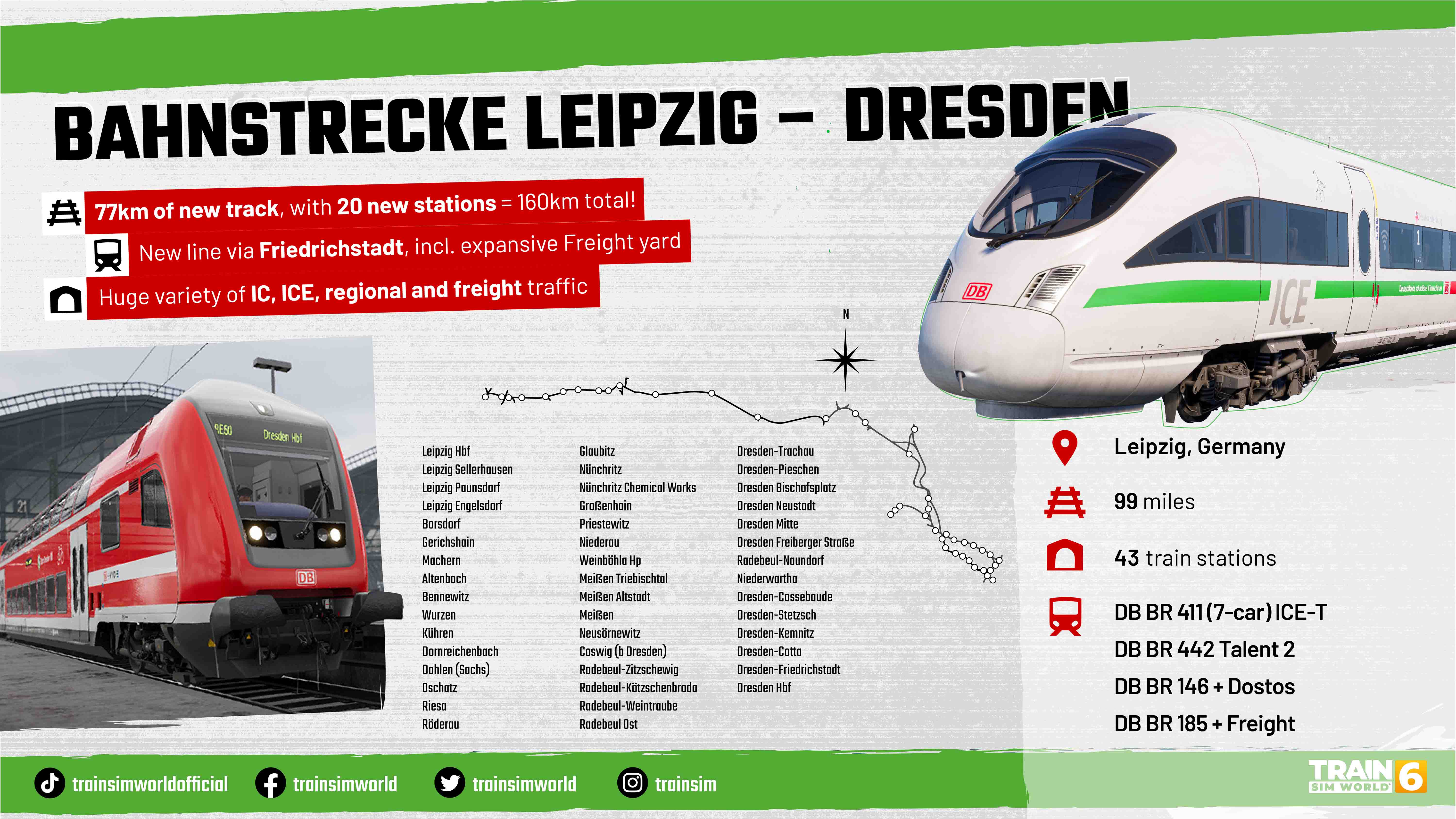
- Length: 99 mi
- Country: Germany
- Operator: Deutsche Bahn
- Stations: 43
- Released: 30th September 2025
Product Links
Locomotives
- DB BR 411 ICE-T
- DB BR 442 Talent 2
- DB BR 146
- DB BR 143
- MRCE 185.2
- DB BR 363
- 766.2 DBpbzfa DB
Training
- Bahnstrecke Leipzig - Dresden Route Introduction
- DB BR 411 ICE T Introduction
- DB BR 442 Talent 2 Introduction
- DB BR 143 Introduction
- DB BR 146.2 Introduction
- DB BR 185.2 Introduction
- DBB BR 363 Introduction
- DB BR 294 Introduction (Add-On)
- BR 145 Expert - Introduction (Add-On)
- BR 145 Expert - Setup from Cold & Dark (Add-On)
- BR 145 Expert - Enabling and Disabling Safety Systems (Add-On)
- BR 145 Expert - Fault Diagnosis (Add-On)
- BR 145 Expert - Freight Train Preperations (Add-On)
Rail Journeys
Saxony Appeal (7 Chapters, 36 Services)
Indestructible V 90 (DB BR 294 Add-On) (2 Chapters, 11 Services)
Pocketable Waggons (Expert 145 Add-On) (4 Chapters, 19 Services)
Scenarios
- Diceversion
- Put It In Reverse
- Geisterwagen
- Wagon Once-Over
- Above Ground Adventure
- Caught With Your Pantograph Down
- Leipzig's Big Helper (DB BR 294 Add-On)
- Chemical Chaos (DB BR 294 Add-On)
- Can't Be Contained (DB BR 294 Add-On)
- Expert. Simply Delivered (Expert 145 Add-On)
- Nahverkehr (Expert 145 Add-On)
- Auf Abwegen (Expert 145 Add-On)
- Faulty Friday (Expert 145 Add-On)
Route Map
Route Hopping
| Starting Point | Destination | ||
| Route | Location | Route | Location |
| Bahnstrecke Leipzig - Dresden | Dresden Hbf | Tharandter Rampe Dresden Chemnitz | Dresden Hbf |
Media
- (Article) Train Sim World 6 – New Horizons to Leipzig
- (Article) DB BR 145 Expert - Coming Soon!
- (Video) Bahnstrecke Leipzig-Dresden Preview Stream
- (Video) Leipzig-Dresden ROUTE ROUNDUP
- (Video) Leipzig-Dresden | Showcase
- (Video) Bahnstrecke Leipzig - Dresden Dev Diary
- (Video) Expert DB BR 145 - Expert Features Showcase
- (Video) Expert DB BR 145 Preview Livestream
- (Guide) BR 294 Tutorial
Manual
Frequently Asked Questions
What changes have been made to the Leipzig - Dresden timetable on PS4 & Xbox One?
Leipzig-Dresden will have no additional AI layers, and a reduced number of playable services on 8th gen consoles. All playable services will use the BR 442. Other included trains (ICE-T, BR 143, BR 146, BR 185) will be available to operate in Scenarios. The only additional layer will be for a selection of playable BR 294 services There will be no AI-only traffic (services that are not otherwise playable) or freight services.
What can you tell me about the Expert 145?
A total of 103 BR 145s would be built between 1997 and 2000, their sleek exteriors providing a stark contrast to the boxy standards of the previous generation. Meanwhile under the hood, with modern screens in the cab and powerful asynchronous electric motors, they started the transformation of Europe’s cargo-hauling fleet and went on to inspire the design of the iconic TRAXX family.
What liveries does the Expert 145 come with?
In this Add-on, the BR 145 features not only the standard Deutsche Bahn livery, but RBH blue as well - a new freight brand for Train Sim World. The 'NV' variant of DB BR 145 is also included representing their limited use as passenger locomotives and this variant includes a highly detailed FT95 PIS System plus changes to the cab and machine room.
What rolling stock does the Expert 145 come with?
Brand new T3000e container flats are included in this Add-on, alongside Expert-upgraded versions of existing and commonplace wagons; the Zacns, Habbiins and Sggmrss 90.
What new features does the Expert 145 support?
Like the previous Expert DB BR 101 Add-on, the Expert BR 145 has implemented a number of 'Expert' features that go into a complex level of detail not seen in other locomotives and trains in Train Sim World.
These features are focussed on providing an intimately complex experience for the most hardened TSW players and can be disabled in the Main Menu (Expert Mode -> Off) for a more typical level of interaction in the cab.
They include:
- Fully modelled and interactive Machine Room
- Full Bremsgerüst
- Interactive Fuses
- Fault Simulation
- GSM-R simulation, down to individual cell towers
But that's not all! With the BR 145, TSG will also be keeping your busy outside the locomotive with Expert Coupling! Climb between the loco and wagons, pick up the chain and hook it up yourself - don’t forget to connect the brake pipes!
What changes have been made to the braking simulation on the Expert 145?
Thermal simulation also affects the exterior; you may have to unfreeze the brakes in the cold by 'hammering' them or stop the locomotive and fix overheating. These elements are visual and can be seen in effect. External fuses are also now simulated.
It will be possible to encounter stuck brakes, which will begin to overheat. There is also a chance that you will pass a hot axle detector and the responsible signaller will call you to advise you of this. Be careful! Certain wagons do not respond well to quickly applying and releasing brakes, which might trigger these issues.
How do I calculate the PZB data for the Expert 145?
For accurate freight train simulation, TSG have implemented an automatic Bremszettel in the cab, with all the needed information on length/wagon weight to calculate the PZB data more easily. This means that you don’t need to calculate or obtain the information beforehand.
Via the table you can find your train's maximum speed, brake percentage required and even the different brake modes for each wagon type. The 'Einstelltabelle' on the cab's back wall will help you enter the correct values.
This is especially helpful if you encounter any broken wagons. When spawning consists in timetable mode with Expert Mode enabled in the Settings, you will now have a chance for broken wagons to spawn and for varied brake performance throughout the train.
How does the Expert 145 simulate faults?
Like the Expert DB BR 101, the fault-finding aspect to this release is fully simulated. This is different to the Train Sim World 6 core feature of 'Train Faults' and presents instead a number of complex faults to be diagnosed and remedied using the interactive in-cab screens and fuses / breakers. This includes various faults, from harmless to serious, and for the first time these pages have been translated to English for ease of use.
A series of Scenarios and Tutorials will be able to guide the player through the fault-finding process. A Manual is also be provided to assist players with this process and certain elements will require reading before embarking on services.
Will the Expert 145 be compatible with 8th gen consoles?
No, the Expert DB BR 145 Loco Add-On will only be available on Xbox Series X|S, PlayStation 5, Epic Games Store, and Steam.
Expansions
The following add-ons are compatible with this route and are designed to expand it with new content.
- DB BR 294 Diesel Shunter (3 Scenarios, 1 Tutorial, Timetable Support)
- Expert DB BR 145 Loco Add-On (4 Scenarios, 5 Tutorials, Timetable Support)
TSW Add-On Database
Please visit the Train Sim World Add-On Database for further details on this add-on, including:
- Game Mode & Feature Support
- Additional Layers
- Platform Differences
- Gen 8 Compatibility