Train Faults
Train Faults will be a series of non-fatal faults that can be easily reset. Players will get a pop up when a fault occurs so that they can then take the necessary action to clear it. In all cases, Train Faults will only apply to the player train and not AI trains.
Important: Player Assist notifications must be enabled to see Random Fault messages.
Trains Faults are applied contextually on a per loco basis. The following list is an example of what was available in Train Sim World 6 at launch.
| Loco Name | Faults |
|---|---|
| NJ TRANSIT® Arrow III | Wiper Stuck Headlight Fuse Ditchlight Fuse Marker/Platform/Number Fuse Cab Heating Fuse Passenger Door Stuck Pantograph Drops |
| NJ TRANSIT® ALP-45DP | Wiper Stuck Headlight Fuse Ditchlight Fuse Cab Heating Fuse Pantograph Drops |
| GWR Class 150 | Wiper Stuck Diesel Engine stalls Passenger Door Stuck |
| CrossCountry Class 220 Voyager | Wiper Stuck Diesel Engine stalls Passenger Door Stuck |
| DB BR 442 | Wiper Stuck Circuit Breaker Opens Pantograph Drops Handbrake Applies Passenger Lights Off Tempomat Zero Speed Passenger Door Stuck |
| DB BR 294 | Wiper Stuck Handbrake Applies Control Stand Deactivate Diesel Engine stalls |
How to Resolve Train Faults
| Fault | Resolution | Image |
|---|---|---|
| Passenger Door Stuck | Manually inspect every door for gaps. The faulty door will be slightly ajar. Open and close the door to resolve. | |
Wiper Stuck
| Turn the wipers to the Off/Park position. Then, turn them back to On. | |
| Headlight Fuse | Open the rear fuse panel and find the Headlight fuse. Flip the fuse to the On position. | |
| Ditchlight Fuse | Open the rear fuse panel and find the Ditchlight fuse. Flip the fuse to the On position. | |
| Marker/Platform/Number Fuse | Open the rear fuse panel and find the Marker fuse. Flip the fuse to the On/Cut-In position. | |
| Cab Heating Fuse | Open the rear fuse panel and find the Heating fuse. Flip the fuse to the cut-in position. | |
| Pantograph Drops | Raise the pantograph using the pantograph control switch. However, it's possible this may need to be done in a different vehicle of the formation. | |
| Diesel Engine stalls | The engine start-up process varies between locos. However most locos will have an Engine Start/Stop button in the cab. This is often train-lined in MUs (Multiple Units). You will need to come to a complete stop, fully apply the brakes, reset all the controls to their original positions and Stop the engine. Then hold the Engine Start button to restore power. | |
| Circuit Breaker Opens | Close the Master Circuit Breaker via the switch in the cab. However, it's possible this may need to be done in a different vehicle of the formation. | |
| Handbrake Applies | Release the handbrake via the Wheel, Lever or electronic button controls. | |
| Passenger Lights Off | Restore Passenger Lighting via the Train Line, Train Light, or Aux Lighting control in the cab. Press the button or move the switch to the On position. If it is a Train Line or HEP system, then find the Start control. | |
| Tempomat Zero Speed | Turn Off the Speed Control, then turn it back On. |
Random Behaviours
(Main Menu > Settings > General)
These settings will allow you to fully customise how frequently random events and train faults affect your gameplay.
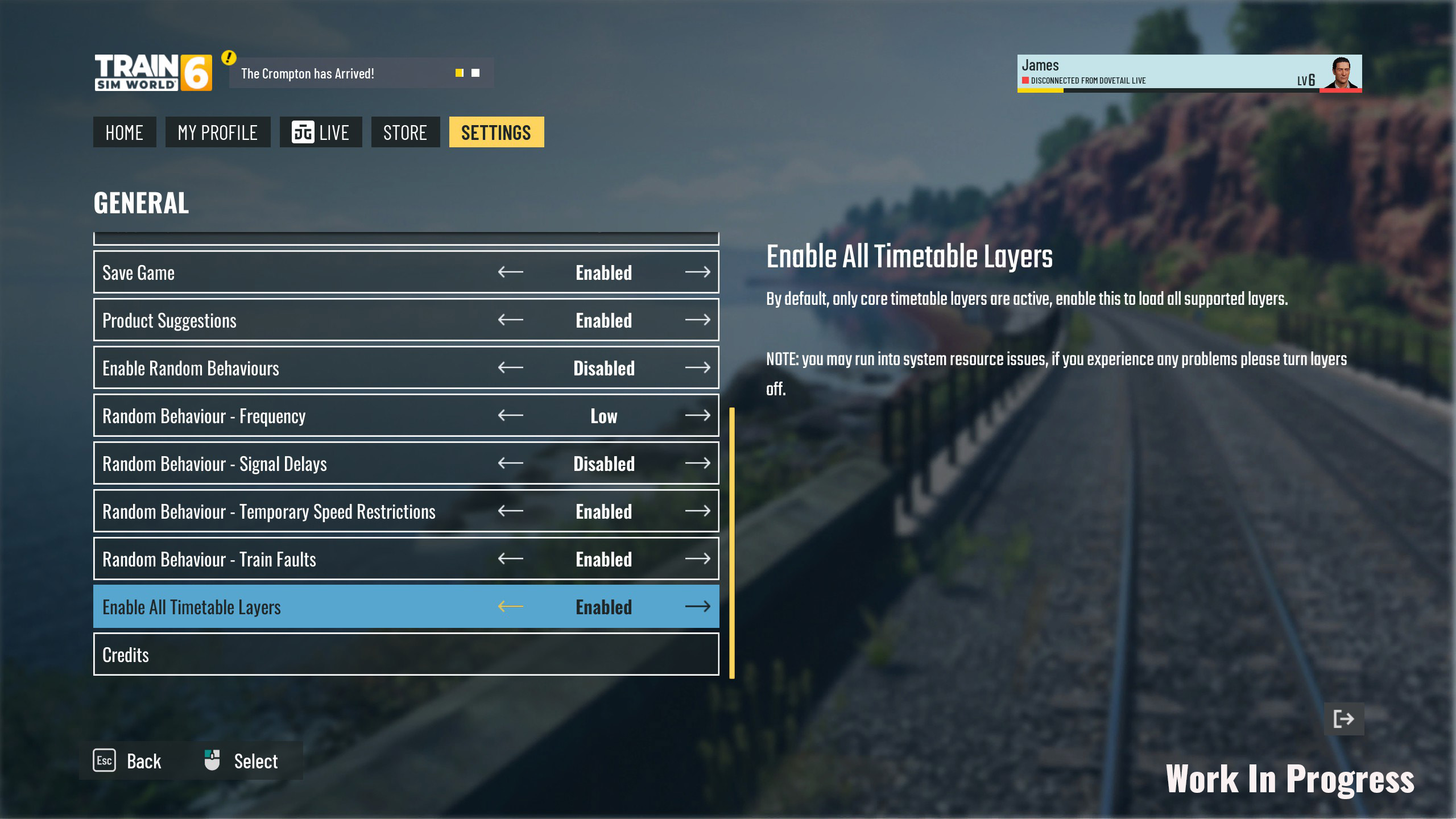
Random Events
Signal Delays - Signal Delays will occur in timetable mode, meaning certain signal aspects will alter later than is normally expected in Train Sim World. Whilst the effect might not be immediate in one isolated delay, the knock-on effect may result in AI trains overtaking yours or a build up of delays over the course of a full service run.
Signal Delays will be available in the new routes and will be applied to back catalogue routes for Train Sim World 6 players.
Temporary Speed Restrictions - Signs will appear beside the track to give a visual indication of where any restrictions start and end.
The HUD will also react to these restrictions, giving you a clearer guide as to when you need to slow down to comply with the restrictions.
After reviewing the complexities of adding non-authentic assets to certain routes (i.e. modern-day assets on a historic route, or German signage appearing on a Dutch route, for example), we will just be implementing this for launch on TSW6 routes and will review opportunities to add to older content in the future.